
Home : Workshop : CNC : Estlcam :
Estlcam VS Easel
Both are CAM, G-code senders, and motion control packages and I spent a lot of time with Easel before switching to Estlcam. While Estlcam has a lot more advanced features than Easel (...I see Pro finally has ramping), the interface is not as clean/intuitive as Easel and v-carving text is easier with Easel (...but it's now subscription based and Inkscape to Estlcam is actually pretty easy).
One of the key functional differences between Estlcam and Easel is that Easel can only cut inside/outside of a closed line/path (e.g. a circle). Any shape with ends that don't meet (e.g. a line) can only be "Cut on shape path". I'm guessing that the closed line restriction/awareness is why Easel will never cut into an adjacent line (on the same closed path). Any irregular pocket cutting (e.g. text) with a straight bit is affected. If the space between two lines is smaller than the bit, Easel won't cut it. While Estlcam will cut into the adjacent line if the space between two lines (e.g. text) is smaller than the bit, it can cut to the right or left of open paths, e.g. lines.
 ...It took me quite some time to figure out that right and left are from the perspective of the end of the line that is closest to the mouse cursor when it is clicked (this is obvious in v12). By default all Estlcam engraving is cut bidirectionally (back and forth along the line), the right/left of the line conventional/climb cut directions only matter when unidirectional cutting is desired.
While bidirectional cutting is fast and efficient (great for roughing) any machine/bit flex will create noticeable ridges on the cut face because each pass will flex the machine in the opposite direction, i.e. not ideal for hobby level machines. A unidirectional finishing pass can clean things up and unidirectional climb cutting can minimize tearout when cutting against the grain.
V11 engraving cuts will all be unidirectional when both a finishing allowance and finishing tool are added to path properties. Bidirectional roughing followed by a full depth unidirectional finishing pass (w/ v11 or 12) requires setting two separate paths and using two different tools or definitions (e.g. Engrave with finish pass example - YouTube).
Starting with v12.129 Estlcam has a Start point/icon option that makes all engraving cuts unidirectional. This is counterintuitive in that setting a path only sets the start point of the first pass, by default subsequent passes will start at the end of the first pass, i.e. cuts will be bidirectional unless a second/same start point is set using the Start icon.
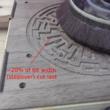 Another area where Estlcam and Easel differ is when cutting pockets. The example is a complex maze and both programs were set to cut parallel/offset (Estlcam changed/Easel default). Both generated paths that jump around a lot and it isn't obvious which moves around more. Both appear to use an ~40% stepover, but Estlcam leaves an ~20% path around the perimeter. While this does result in an additional path in some places, that 20% path is cut last - no finish pass required... Side note: Estlcam set to parallel provides the best results on narrow pockets, but the algorithm is too conservative/safe, i.e. too many unnecessary and time consuming passes... because parallel stepover is limited to 45% (regardless of bit settings).
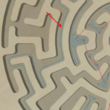 The Easel generated path includes some full width cuts along the perimeter (more likely to leave wall marks and top tearout). While both can leave islands (which can break and tear grain) and it would be nice to see everything cut from center out, Estlcam saving the perimeter for a 20% wide final pass is a big plus.
...While there are a lot more Easel VS Estlcam topics, I no longer teach Easel classes and it's been over a year since I logged in/have done anything Easel related.
One of the key functional differences between Estlcam and Easel is that Easel can only cut inside/outside of a closed line/path (e.g. a circle). Any shape with ends that don't meet (e.g. a line) can only be "Cut on shape path". I'm guessing that the closed line restriction/awareness is why Easel will never cut into an adjacent line (on the same closed path). Any irregular pocket cutting (e.g. text) with a straight bit is affected. If the space between two lines is smaller than the bit, Easel won't cut it. While Estlcam will cut into the adjacent line if the space between two lines (e.g. text) is smaller than the bit, it can cut to the right or left of open paths, e.g. lines.
 ...It took me quite some time to figure out that right and left are from the perspective of the end of the line that is closest to the mouse cursor when it is clicked (this is obvious in v12). By default all Estlcam engraving is cut bidirectionally (back and forth along the line), the right/left of the line conventional/climb cut directions only matter when unidirectional cutting is desired.
While bidirectional cutting is fast and efficient (great for roughing) any machine/bit flex will create noticeable ridges on the cut face because each pass will flex the machine in the opposite direction, i.e. not ideal for hobby level machines. A unidirectional finishing pass can clean things up and unidirectional climb cutting can minimize tearout when cutting against the grain.
V11 engraving cuts will all be unidirectional when both a finishing allowance and finishing tool are added to path properties. Bidirectional roughing followed by a full depth unidirectional finishing pass (w/ v11 or 12) requires setting two separate paths and using two different tools or definitions (e.g. Engrave with finish pass example - YouTube).
Starting with v12.129 Estlcam has a Start point/icon option that makes all engraving cuts unidirectional. This is counterintuitive in that setting a path only sets the start point of the first pass, by default subsequent passes will start at the end of the first pass, i.e. cuts will be bidirectional unless a second/same start point is set using the Start icon.
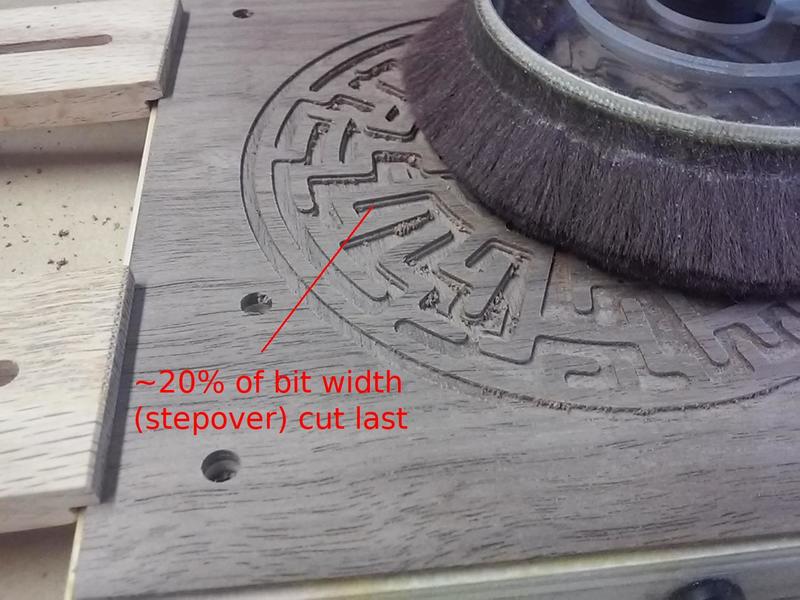 Another area where Estlcam and Easel differ is when cutting pockets. The example is a complex maze and both programs were set to cut parallel/offset (Estlcam changed/Easel default). Both generated paths that jump around a lot and it isn't obvious which moves around more. Both appear to use an ~40% stepover, but Estlcam leaves an ~20% path around the perimeter. While this does result in an additional path in some places, that 20% path is cut last - no finish pass required... Side note: Estlcam set to parallel provides the best results on narrow pockets, but the algorithm is too conservative/safe, i.e. too many unnecessary and time consuming passes... because parallel stepover is limited to 45% (regardless of bit settings).
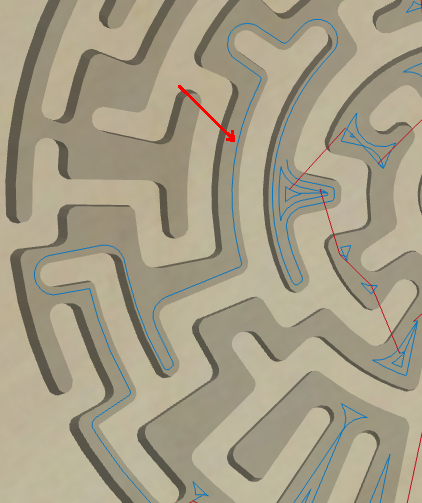 The Easel generated path includes some full width cuts along the perimeter (more likely to leave wall marks and top tearout). While both can leave islands (which can break and tear grain) and it would be nice to see everything cut from center out, Estlcam saving the perimeter for a 20% wide final pass is a big plus.
...While there are a lot more Easel VS Estlcam topics, I no longer teach Easel classes and it's been over a year since I logged in/have done anything Easel related.
