
Home : Linux : Software : Nzbget : PPWeb :
How-to
NzbGet Webui
Changing SVN Repository
Lighttpd Configuration
Perl Modules
Remote Post Processing
Basic Categories
Advanced Example
NZBGet Settings
Questions - for all PPWeb related questions or issues.
You're also welcome to post new new How-to topics.

Changing SVN Repository
Lighttpd Configuration
Perl Modules
Remote Post Processing
Basic Categories
Advanced Example
NZBGet Settings
Questions - for all PPWeb related questions or issues.
You're also welcome to post new new How-to topics.
NzbGet Webui
PPWeb supports the new NzbGet Webui, if the webui directory is a sub-directory of the parent ppweb directory (like nzbgetweb) and the PPWeb owner has write permissions. Auto configuration will add links that allow you to jump between the new Webui and PPWeb/NzbgetWeb... Starting with NZBGet r479, you can also use the Webui to configure PPWeb and NZBGet.
[ comment | link | top ]
[ comment | link | top ]
Changing SVN Repository
The primary/stable svn repository has changed to Google Code... The repository at davelers.com is no longer available (Oct '14).
To change from davelers to googlecode (3 commands, 2nd includes 's/...g/')
cd /your/path/to/ppweb
find . -name entries | xargs perl -pi -e 's/52809d3e-9b55-42f7-bf3c-1b95a339b368/d406fa66-81d3-5def-5f9f-940a6c657d48/g'
svn switch --relocate http://davelers.com/svn/ppweb/trunk http://ppweb.googlecode.com/svn/trunk
[ comment | link | top ]
To change from davelers to googlecode (3 commands, 2nd includes 's/...g/')
cd /your/path/to/ppweb
find . -name entries | xargs perl -pi -e 's/52809d3e-9b55-42f7-bf3c-1b95a339b368/d406fa66-81d3-5def-5f9f-940a6c657d48/g'
svn switch --relocate http://davelers.com/svn/ppweb/trunk http://ppweb.googlecode.com/svn/trunk
[ comment | link | top ]
Perl Modules
PPWeb only requires two fairly standard/basic perl modules. It's much easier, faster, and less frustrating to install them using a package manager (perl-cgi and perl-libwww pkgs), but I was able to get a working ppweb using CPAN. I just accepted the defaults / hit enter on every question. The following is abbreviated, the two out of three semi failures was not encouraging, but using the force option (parens) on the failures did result in functioning modules.
# perl -MCPAN -e shell
cpan> install LWP::UserAgent
cpan> install CGI
(cpan> force install CGI)
cpan> install LWP::Protocol::https
(cpan> force install LWP::Protocol::https)
cpan> q
PPWeb's configure/update script will let you know if you don't have functioning CGI and LWP modules. The https module is only required for NzbsRus and any errors will be printed to the ppweb log.
[ comment | link | top ]
# perl -MCPAN -e shell
cpan> install LWP::UserAgent
cpan> install CGI
(cpan> force install CGI)
cpan> install LWP::Protocol::https
(cpan> force install LWP::Protocol::https)
cpan> q
PPWeb's configure/update script will let you know if you don't have functioning CGI and LWP modules. The https module is only required for NzbsRus and any errors will be printed to the ppweb log.
[ comment | link | top ]
Lighttpd Configuration
Since I've gotten a lot of questions about running PPWeb on lighttpd, I decided to give it a try (I use Apache). If the only configuration file is lighttpd.conf, it needs to include the following three blocks. Otherwise look for and adjust the following blocks where needed.
The minimum required modules are mod_fastcgi and mod_cgi. Full functionality requires all the listed modules. If fastcgi.conf, cgi.conf, etc. files exist (typically in a subdirectory, e.g. /etc/lighttpd/conf.d), look for and uncomment the relevant include lines in modules.conf (or lighttpd.conf). Otherwise, uncomment or add the listed modules to the server.modules block, e.g.:
server.modules = (
"mod_fastcgi",
"mod_cgi",
"mod_setenv",
"mod_rewrite",
"mod_access",
)
see also: server.modules option
mod_fastcgi
The minimum mod_fastcgi configuration (in fastcgi.conf, if it exists) needs to include the path to the PHP executable and a socket (if its preconfigured and enabled, you shouldn't have to change it), e.g.:
fastcgi.server = ( ".php" => ((
"bin-path" => "/usr/bin/php-cgi",
"socket" => "/tmp/php.socket",
)))
see also: mod_fastcgi - fastcgi
mod_cgi
The minimum mod_cgi configuration (in cgi.conf, if it exists) needs to include the perl path for .cgi scripts, e.g.:
cgi.assign = (
".pl" => "/usr/bin/perl",
".cgi" => "/usr/bin/perl",
)
mod_setenv
...The `which [exec]` calls I added in r143 (for nice, ionice, nzbget, etc. PATH lookups) were failing with lighttpd until I added mod_setenv (above) and
setenv.add-environment = ( "PATH" => env.PATH )
to my lighttpd.conf. The solution was found here. Note: this isn't required, you can find and set your own paths. I was hoping the which tests would simplify things, but no such luck.
...Note: I'm pretty sure not having mod_setenv enabled/setup is responsible for some of the other issues folks have had with PPWeb, i.e. enabling it is highly recommended.
mod_rewrite
...The Newznab sites direct download/queue option (added in r131) needs mod_rewrite (added above) and the following somewhere in your lighttpd.conf (adjust the relative path if needed):
url.rewrite-once = (
"^/api/?\?(.+)$" => "/ppweb/ppweb/cgi-bin/ppweb_sab.cgi?$1"
)
Newznab sites also need to reach your web sever - http://foo/, not your ppweb install. The only thing they send is a query string (http://foo/api/?mode=addurl&...) that provides PPWeb with the information it needs to fetch an nzb.
mod_access
...If you allow the public to access your server, folks who know what to look for can access PPWeb generated content. If you allow public access, restricting your ppweb directory to LAN computers/users is highly recommended. I currently don't have lighttpd setup and cannot test this (don't know if SAB redirect will work).
# deny access to users not in the LAN - 10.0.0.0/8, 192.168.0.0/16 or? - whichever is appropriate.
$HTTP["url"] =~ "^/ppweb/" {
$HTTP["remoteip"] != "192.168.0.0/16" {
url.access-deny = ( "" )
}
}
[ comment | link | top ]
The minimum required modules are mod_fastcgi and mod_cgi. Full functionality requires all the listed modules. If fastcgi.conf, cgi.conf, etc. files exist (typically in a subdirectory, e.g. /etc/lighttpd/conf.d), look for and uncomment the relevant include lines in modules.conf (or lighttpd.conf). Otherwise, uncomment or add the listed modules to the server.modules block, e.g.:
server.modules = (
"mod_fastcgi",
"mod_cgi",
"mod_setenv",
"mod_rewrite",
"mod_access",
)
see also: server.modules option
mod_fastcgi
The minimum mod_fastcgi configuration (in fastcgi.conf, if it exists) needs to include the path to the PHP executable and a socket (if its preconfigured and enabled, you shouldn't have to change it), e.g.:
fastcgi.server = ( ".php" => ((
"bin-path" => "/usr/bin/php-cgi",
"socket" => "/tmp/php.socket",
)))
see also: mod_fastcgi - fastcgi
mod_cgi
The minimum mod_cgi configuration (in cgi.conf, if it exists) needs to include the perl path for .cgi scripts, e.g.:
cgi.assign = (
".pl" => "/usr/bin/perl",
".cgi" => "/usr/bin/perl",
)
mod_setenv
...The `which [exec]` calls I added in r143 (for nice, ionice, nzbget, etc. PATH lookups) were failing with lighttpd until I added mod_setenv (above) and
setenv.add-environment = ( "PATH" => env.PATH )
to my lighttpd.conf. The solution was found here. Note: this isn't required, you can find and set your own paths. I was hoping the which tests would simplify things, but no such luck.
...Note: I'm pretty sure not having mod_setenv enabled/setup is responsible for some of the other issues folks have had with PPWeb, i.e. enabling it is highly recommended.
mod_rewrite
...The Newznab sites direct download/queue option (added in r131) needs mod_rewrite (added above) and the following somewhere in your lighttpd.conf (adjust the relative path if needed):
url.rewrite-once = (
"^/api/?\?(.+)$" => "/ppweb/ppweb/cgi-bin/ppweb_sab.cgi?$1"
)
Newznab sites also need to reach your web sever - http://foo/, not your ppweb install. The only thing they send is a query string (http://foo/api/?mode=addurl&...) that provides PPWeb with the information it needs to fetch an nzb.
mod_access
...If you allow the public to access your server, folks who know what to look for can access PPWeb generated content. If you allow public access, restricting your ppweb directory to LAN computers/users is highly recommended. I currently don't have lighttpd setup and cannot test this (don't know if SAB redirect will work).
# deny access to users not in the LAN - 10.0.0.0/8, 192.168.0.0/16 or? - whichever is appropriate.
$HTTP["url"] =~ "^/ppweb/" {
$HTTP["remoteip"] != "192.168.0.0/16" {
url.access-deny = ( "" )
}
}
[ comment | link | top ]
Basic Categories
The nzb directory/category tree mirrors the download directory tree. When you place an nzb in a nzb sub-directory, the files will be downloaded to a nzb-name sub-directory in the matching download sub-directory. The nzbgetpp.pl script will extract any archives and delete any unwanted files... Because most folks want TV Show subcategories (with Season sub-directories), SaveDir is now enabled in default configuration. All SaveExt files are moved to SaveDir and the DestDir is deleted if empty.
The PPWeb default setup (parens) is configured with TV and Movie categories. TV watch list items and nzbs from nzb site TV categories are automatically queued to the TV category, video watch list items and nzb site movie categories to the Movies category.
NzbDir (nzb)
Category (TV, Movies)
nzb-name.nzb
 DestDir (download)
Category (TV, Movies)
nzb-name directory
 SaveDir (save) - optional
Category (TV, Movies)
Show (TvCats=all)
(Season - TvCatSeason=)
(Movie/nzb-name - NzbCats=)
[ comment | link | top ]
The PPWeb default setup (parens) is configured with TV and Movie categories. TV watch list items and nzbs from nzb site TV categories are automatically queued to the TV category, video watch list items and nzb site movie categories to the Movies category.
NzbDir (nzb)
Category (TV, Movies)
nzb-name.nzb
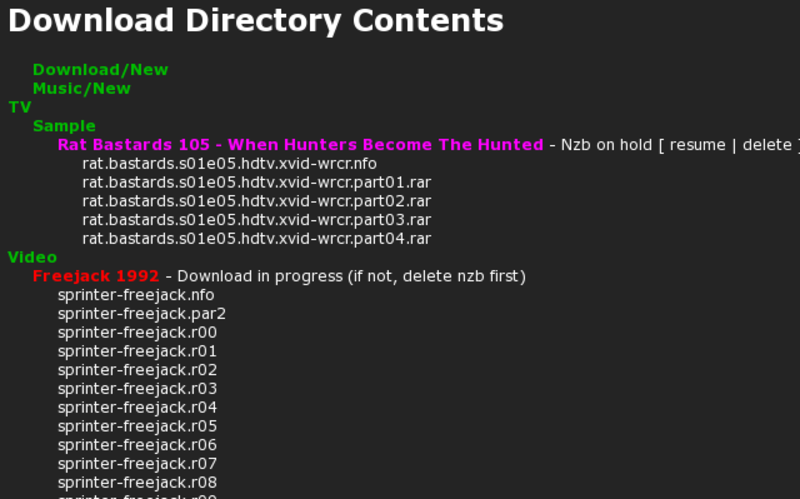 DestDir (download)
Category (TV, Movies)
nzb-name directory
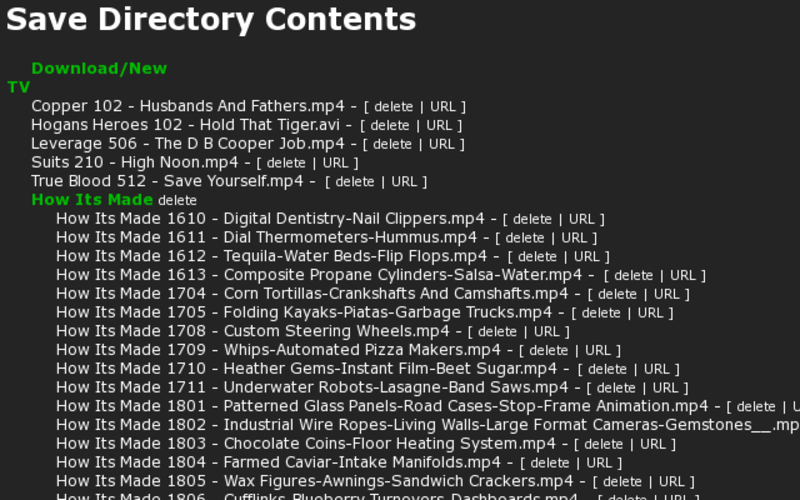 SaveDir (save) - optional
Category (TV, Movies)
Show (TvCats=all)
(Season - TvCatSeason=)
(Movie/nzb-name - NzbCats=)
[ comment | link | top ]
Advanced Example
My desire is too keep all NZBGet tasks separate from the files I want to keep (SaveExt). I also like to be able to put the extracted files in any directory that I own (SaveDir is my home dir). I only want nzb-name sub-directories (NzbDir) when the nzb will result in more than a few saved files. I want all my downloaded Video and TV files renamed (Rename).
NZBGet directory ($MAINDIR)
NzbDir
Category (Download, Music, TV, Video)
nzb-name.nzb
Category (foo/bar)
nzb-name.nzb
DestDir
Category (Download, Music, TV, Video)
nzb-name directory
downloaded files
SaveDir directory (only SaveExt files, e.g. extracted)
Download (Category)
files
Music (Category and NzbCats)
nzb-name directory
files
TV (Category and Rename)
Show nnn - title.ext (EpLabel and EpTitle - Show not listed in TvCats)
Show (TvCats)
Show nnn - title.ext (EpLabel - EpTitle)
Video (Category and Rename)
renamed files - typically nzb-name (a/b).ext
[ comment | link | top ]
NZBGet directory ($MAINDIR)
NzbDir
Category (Download, Music, TV, Video)
nzb-name.nzb
Category (foo/bar)
nzb-name.nzb
DestDir
Category (Download, Music, TV, Video)
nzb-name directory
downloaded files
SaveDir directory (only SaveExt files, e.g. extracted)
Download (Category)
files
Music (Category and NzbCats)
nzb-name directory
files
TV (Category and Rename)
Show nnn - title.ext (EpLabel and EpTitle - Show not listed in TvCats)
Show (TvCats)
Show nnn - title.ext (EpLabel - EpTitle)
Video (Category and Rename)
renamed files - typically nzb-name (a/b).ext
[ comment | link | top ]
Remote Post Processing
PPWeb can do all post processing on a remote *nix machine. This allows you to run NZBGet on a low powered 24/7 firewall/router/server and offload CPU intensive post processing to another machine. This is how I have been using ppweb for some years now.
Remote processing is automatic if the remote machine is up. If the remote machine was down when the downloads were completed, post processing can be triggered via links on the web interface Download page.
Both machines need to have ssh, rsync, scp and key-pairs. The remote also needs unrar and par2 (transcode for avimerge is optional).
For remote Processing set the variables in Configuration : PP Remote Processing.
Copy nzbgetpp.pl, ppweb.pm and ppweb.conf (in /cgi-bin, /lib and /conf) to RemoteDest.
Set the $Config and require paths to RemoteDest and $IsRemote to "1" in the remote copy of nzbgetpp.pl.
For remote par repair functions, enable General : PPWebPar (recommended).
For sample downloads set Paths : SampleDir to the full path on the remote.
For remote SaveDir/categories, set SaveDir to the full path on the remote.
Post processing happens in nzb-name sub directories of RemoteDest. Unlike DestDir, RemoteDest has no category sub directories. But, like local post processing, save file extensions can be moved to SaveDir and Category sub directories (recommended).
RemoteDest
nzb-name directories
nzbgetpp.pl
ppweb.conf
ppweb.pm
SaveDir (optional)
Categories
SaveExt files
[ comment | link | top ]
Remote processing is automatic if the remote machine is up. If the remote machine was down when the downloads were completed, post processing can be triggered via links on the web interface Download page.
Both machines need to have ssh, rsync, scp and key-pairs. The remote also needs unrar and par2 (transcode for avimerge is optional).
For remote Processing set the variables in Configuration : PP Remote Processing.
Copy nzbgetpp.pl, ppweb.pm and ppweb.conf (in /cgi-bin, /lib and /conf) to RemoteDest.
Set the $Config and require paths to RemoteDest and $IsRemote to "1" in the remote copy of nzbgetpp.pl.
For remote par repair functions, enable General : PPWebPar (recommended).
For sample downloads set Paths : SampleDir to the full path on the remote.
For remote SaveDir/categories, set SaveDir to the full path on the remote.
Post processing happens in nzb-name sub directories of RemoteDest. Unlike DestDir, RemoteDest has no category sub directories. But, like local post processing, save file extensions can be moved to SaveDir and Category sub directories (recommended).
RemoteDest
nzb-name directories
nzbgetpp.pl
ppweb.conf
ppweb.pm
SaveDir (optional)
Categories
SaveExt files
[ comment | link | top ]
NZBGet Settings
For reference only, the following are all preconfigured by PPWeb
AppendCategoryDir
Yes for remote processing, otherwise your choice
AppendNzbDir
Always yes (PPWeb NzbDir is optional)
MergeNzb
Yes, allows concurrent sample and other queueing
DupeCheck
Yes allows sample downloads to be resumed
DeleteCleanupDisk
No, could interfere with sampling
RenameBroken
Always no
CreateBrokenLog
Yes may save a bit of time in some cases
LoadPars
Always "one"
ParCheck
No if remote processing, your choice otherwise (no will be faster if you seldom need par repair)
ParRepair
Yes, delayed when ParCheck=no (has no effect on remote processing)
AllowReProcess
Yes, needed for remote processing (currently has no effect on local processing)
[ comment | link | top ]
AppendCategoryDir
Yes for remote processing, otherwise your choice
AppendNzbDir
Always yes (PPWeb NzbDir is optional)
MergeNzb
Yes, allows concurrent sample and other queueing
DupeCheck
Yes allows sample downloads to be resumed
DeleteCleanupDisk
No, could interfere with sampling
RenameBroken
Always no
CreateBrokenLog
Yes may save a bit of time in some cases
LoadPars
Always "one"
ParCheck
No if remote processing, your choice otherwise (no will be faster if you seldom need par repair)
ParRepair
Yes, delayed when ParCheck=no (has no effect on remote processing)
AllowReProcess
Yes, needed for remote processing (currently has no effect on local processing)
[ comment | link | top ]
Questions
Posted by Dave L on Thursday, 08-Mar-2012
There's a lot about PPWeb that isn't documented. I'm happy to help with any PPWeb related questions or issues.
[ page | comments (34) - Tuesday, 23-Apr-2013 | top ]